


For your model.
Slide-In Round · As a design object
Tablet Wall Mount for Samsung Galaxy Tab - Slide-In Round
Tablet Wall Mount for Samsung Galaxy Tab - Slide-In Roundincl. VAT. Free shipping within Germany, €4.99 to AT, BE, FR, IT and NL. Shipping info · Country missing?For other countries, you need a delivery address in Germany. Want delivery to your country? Request your country
Made in our own workshop in Germany
★ 4.98 / 5 · over 740 reviews on eBay · Profile at SHOPVOTE
Only for the Samsung tablet you selected. Check your model before buying.
Not sure about your model? Open the model finder →
Slide-In Round: round shape as a design object, slides in from the side, removable at any time.
Couldn't load pickup availability
Made in our own workshop in Germany
★ 4.98 / 5 · over 740 reviews on eBay · Profile at SHOPVOTE
- Removable at any time: slide in, take out, no tools
- Round disc at the side, the tablet looks light
- You plug the cable in by hand and unplug it to take the tablet out.
- Portrait or landscape, VESA 100 × 100 hole pattern
- Free DHL shipping within Germany
- Made to fit your model, measured and tested on the original device
- 14-day statutory right of withdrawal


Check before buying
Only for the Samsung tablet you selected. Check your model before buying.
You must check your model number and select the matching variant above. Your tablet only fits without a case.
How to find your model: Open the settings and then the information about your tablet. The model number starts with SM.
The holder is designed to the millimetre for your Samsung tablet. For example, the holder for the Galaxy Tab A9 does not fit the Galaxy Tab A9+.


Small-batch 3D printing from Germany
Not smooth, not made of metal. But made for your model.
Up close you see lines and uneven grooves; from a distance, tablet and plastic holder look like one piece.
Small-batch 3D printing makes a dedicated shape for your model possible.
Shipping & withdrawal
Shipping costs: Shipping is free within Germany. To all other delivery countries we charge a flat €4.99 per order.
Dispatch: We usually dispatch your order within 2 working days of receiving it.
Delivery: DHL usually delivers within 1-3 working days (Germany) or 4-5 working days (Austria, Belgium, France, Italy, Netherlands) after handover to DHL. Delivery time is therefore usually 3-5 working days (Germany) or 6-7 working days (other countries) after your order.
You can withdraw within 14 days without giving reasons, using the “Withdraw from contract” button at the very bottom of the page.
All about shipping and payment: Shipping & payment
In the box


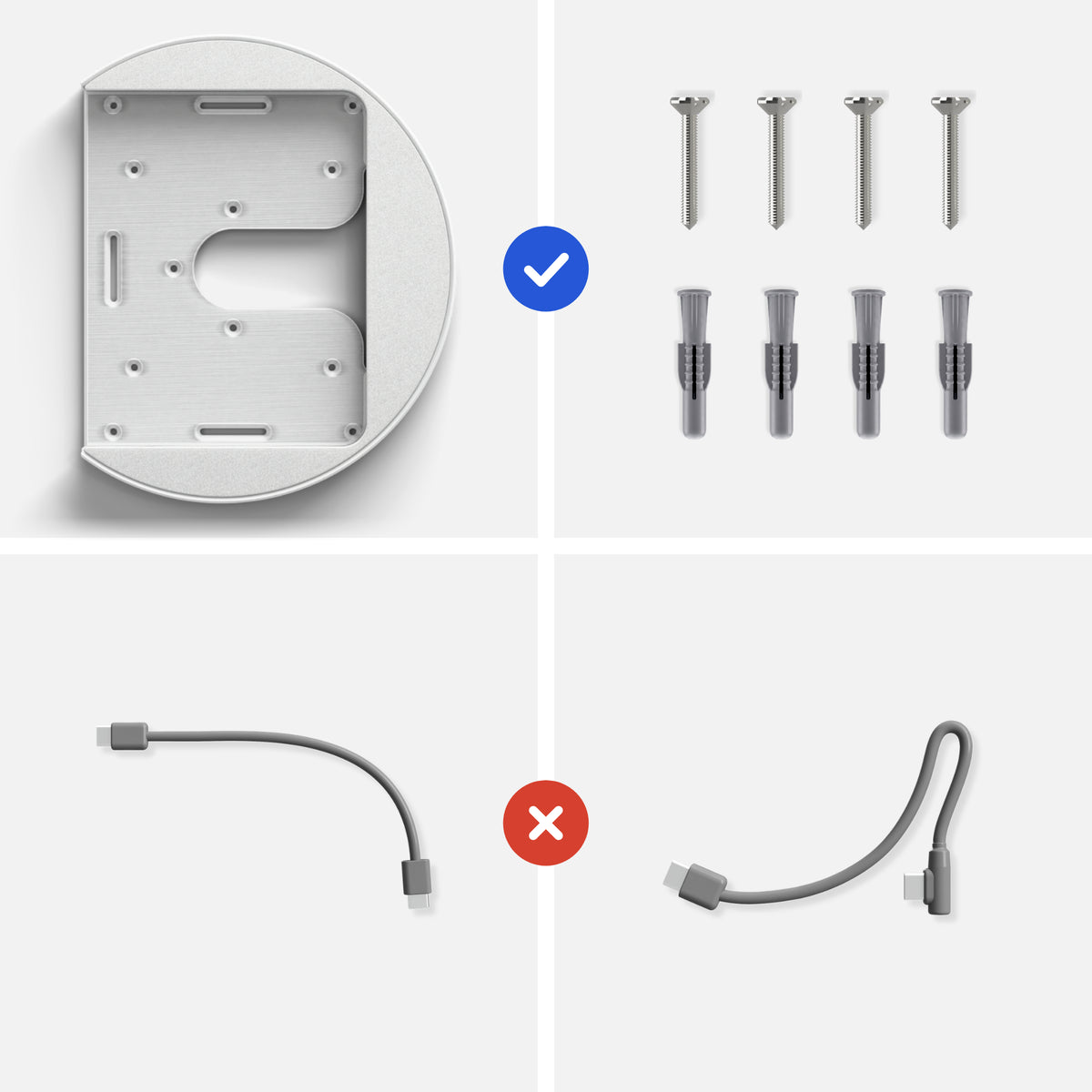
Holder, 4 screws 3 × 40 mm, 4 wall plugs
Fits these models
- For Galaxy Tab A7 (10.4 inch)
- For Galaxy Tab A7 Lite (8.7 inch)
- For Galaxy Tab A8 (10.5 inch)
- For Galaxy Tab A9 (8.7 inch)
- For Galaxy Tab A9 Plus (11 inch)
- For Galaxy Tab A11 (8.7 inch)
- For Galaxy Tab A11 Plus (11 inch)
- For Galaxy Tab A 8.0 (8 inch - 2019)
- For Galaxy Tab A 10.1 (10.1 inch - 2019)
- For Galaxy Tab A 10.5 (10.5 inch - 2018)
- For Galaxy Tab S4 (10.5 inch)
- For Galaxy Tab S5e (10.5 inch)
- For Galaxy Tab S6 (10.5 inch)
- For Galaxy Tab S6 Lite (10.4 inch)
- For Galaxy Tab S7 (11 inch)
- For Galaxy Tab S7 Plus (12.4 inch)
- For Galaxy Tab S8 (11 inch)
- For Galaxy Tab S8 Plus (12.4 inch)
- For Galaxy Tab S9 (11 inch)
- For Galaxy Tab S9 FE (10.9 inch)
- For Galaxy Tab S10 FE (10.9 inch)
- For Galaxy Tab S10 Lite (10.9 inch)
- For Galaxy Tab S11 (11 inch)




Small-batch 3D printing from Germany
Not smooth, not made of metal. But made for your model.
Up close you see lines and uneven grooves; from a distance, tablet and plastic holder look like one piece.
Small-batch 3D printing makes a dedicated shape for your model possible.


On the wall
In daylight on a light-coloured wall.


Size comparison
Next to a light switch in a standard 80 × 80 mm frame, using a 10.9-inch tablet as an example.


Check before buying
Only for the Samsung tablet you selected. Check your model before buying.
You must check your model number and select the matching variant above. Your tablet only fits without a case.
How to find your model: Open the settings and then the information about your tablet. The model number starts with SM.
The holder is designed to the millimetre for your Samsung tablet. For example, the holder for the Galaxy Tab A9 does not fit the Galaxy Tab A9+.
How to use the tablet wall mount


Slide in
In landscape you slide your tablet in from the left, in portrait from above. It sits loosely in the holder and you can pull it out without tools.


Portrait or landscape
You can mount the holder in portrait or landscape. Screws and wall plugs are included. Check whether they suit your wall.


Cable out to the side
There is a stopper in the rim. If you push it out, you can route the cable out at that point. Charging cable and power adapter are not included.


Concealed cable into the wall
Optional: if you have an opening in the wall, you can route the charging cable to it via the cable compartment. An angled connector is an advantage.
Mounting in 3 steps
-


Mark
Align the holder, mark the drill holes.
-


Screw on
Drill, insert the wall plugs, fix with the 4 screws.
-


Slide in
Slide the tablet in from the side.


In the box


-
 4 screws
-
 4 wall plugs


Good to know
- Portrait or landscape
- VESA 100 × 100 hole pattern and additional drill holes
- Use suitable wall plugs for cavity walls
- Only for the tablet without a protective case
Dimensions and details


Details for your selection: Slide-In Round · For Galaxy Tab A9 (8,7 inch)
Choose your model above to see compatibility and outer dimensions for exactly your tablet.
- Compatibility
- Für Samsung For Galaxy Tab A9 (8,7 inch)
- Outer dimensions
- 18.3 × 15.5 × 1.9 cm (width × depth × height)
- Minimum wall cut-out
- Installation depth behind the wall
- Cable
- your own cable, not included
- Fixing
- VESA 100 × 100 hole pattern


In the video
Your tablet stays within reach at all times
Your tablet glides into the round shape, which overlaps the edge along the long sides. A little more than half of your tablet disappears into the wall mount.
For your home and for your business


At home
On the wall it is your smart home hub, on the sofa it is your tablet again: you pull it out and slide it back in later. In the living room, for example, you keep an eye on lights, heating and cameras, in the kitchen on recipes and timers.


In your business
For example, as a room calendar outside the meeting room, for appointments and tasks in the office or as an info display for your team. If you need the tablet at the table, you pull it out and slide it back in afterwards.
On the wall
In daylight on a light-coloured wall.
Mounting
-
Mark
Align the holder, mark the drill holes.
-
Screw on
Drill, insert the wall plugs, fix with the 4 screws.
-
Slide in
Slide the tablet in from the side.
In the box
-
4 screws
-
4 wall plugs
Good to know
- Portrait or landscape
- VESA 100 × 100 hole pattern and additional drill holes
- Use suitable wall plugs for cavity walls
- Only for the tablet without a protective case
Dimensions and details
Details for your selection: Slide-In Round · For Galaxy Tab A9 (8,7 inch)
Choose your model above to see compatibility and outer dimensions for exactly your tablet.
- Compatibility
- Für Samsung For Galaxy Tab A9 (8,7 inch)
- Outer dimensions
- 18.3 × 15.5 × 1.9 cm (width × depth × height)
- Minimum wall cut-out
- Installation depth behind the wall
- Cable
- your own cable, not included
- Fixing
- VESA 100 × 100 hole pattern
Size comparison
Next to a light switch in a standard 80 × 80 mm frame, using a 10.9-inch tablet as an example.
Take a look at the rest of our range too

 Slide-In
29,99 €
You slide your tablet in and pull it out again without tools.

 Enclosure
34,99 €
Your tablet sits in the frame, which is screwed on at the sides, and stays in place.

 Picture Frame
44,99 €
Your tablet hangs on the wall like a picture, screwed on at the sides.

 In-Wall Mount
49,99 €
Your tablet sits nearly flush with the surface, for example in the wall or in furniture.
FAQ
Questions and answers

How do I know which Samsung model I have?
Open the settings and then the information about your tablet. The model number starts with SM. The model finder shows which models fit.
Can you see that the tablet holder is 3D printed?
Yes. The surface is uneven, with a pattern of lines. Every one of our holders looks like this, in black and in white. 3D printing does not get as smooth as metal. The rough texture remains visible.
Can I reach the buttons when the tablet is in the holder?
That depends on the model. If a button sits inside the holder, you pull your tablet out a little to press it.
Does the holder also fit with a case or screen protector?
Not with a case: the shape is designed for your tablet without a case. With a thin screen protector, generally yes.
How can the tablet be charged in the holder?
Charging is optional. You plug the cable in by hand and unplug it to take the tablet out. It runs into the wall or out at the rim; to do this, you push out the stopper. An angled connector is an advantage.
How is the holder made?
By 3D printing in our own workshop in Germany, in a shape of its own for each model.
How can I withdraw?
Within 14 days using the “Withdraw from contract” button at the very bottom of every page. You receive the confirmation of receipt by email.
Several devices for your business?
Request a quote